For most small UK businesses, a WordPress website cost comes down to two numbers: a one-off build fee and a smaller monthly running cost. With a freelance developer, a straightforward brochure site is usually a few days’ work, so think low thousands rather than tens of thousands. A shop or a site with custom features costs more, because there’s more to build and test.
That’s the honest short answer to the WordPress website cost question. The longer answer depends on what your site needs to do, and that’s what this guide covers. I’ll go through what you’re paying for, the seven things that move the price up or down, what it costs to run a site after launch, and how to keep the spend sensible without ending up with something you’ll have to replace in a year.
I build WordPress sites with Divi, ACF, Gravity Forms and WooCommerce for small businesses and agencies, so this guide to WordPress website cost is written from the developer’s side of the quote.

WordPress website cost: what you’re actually paying for
WordPress itself is free. You can download it from WordPress.org today and never pay a penny for the software. So when someone quotes you for a site, you’re not paying for WordPress. You’re paying for time, skill and a handful of tools that sit around it.
Time is the biggest part of any WordPress website cost. A typical build includes planning the pages, designing the layout, building the templates, setting up forms, adding your content, making it work on phones, speeding it up, and getting the basic SEO right before launch. Then there’s testing, fixing the little things testing finds, and going live without breaking anything.
The tools are the smaller part. Most sites need hosting, a domain name, and a few premium plugins or a premium theme. These are usually yearly costs, and they’re part of the ongoing WordPress website cost rather than the build.
When two quotes look wildly different, it’s almost always because one includes more of that list than the other. A cheap quote might not include content entry, mobile testing or any SEO setup. A higher quote might include all of it plus a few rounds of design changes. It’s worth asking exactly what’s in each one before you compare the totals.
7 things that change your WordPress website cost
Every project is different, but the same seven things decide most of your WordPress website cost. If you understand these, you can read any quote properly and see where the money’s going.
1. How many pages you need, and how different they are
Page count matters less to WordPress website cost than most people think. What really matters is how many different page layouts there are. Ten service pages that all share one template are quicker to build than four pages that each look completely different. When I quote, I’m counting templates more than pages.
A simple site might have a home page, an about page, a services page, a contact page and a blog. That’s a handful of layouts and a fairly quick build. Add case studies, team profiles, locations and landing pages, and each new layout adds time.
2. A theme like Divi, or a custom build with ACF
This is one of the biggest swings in WordPress website cost. A page builder theme like Divi lets you build and edit pages visually, which is quicker to set up and easy for you to change later. It suits most small business sites well.
A custom theme built with ACF (Advanced Custom Fields) takes longer, because the templates are coded from scratch and the editing fields are set up exactly for your content. You get a faster, tidier site that’s harder to break, and editing is simpler because you only see the fields you need. It’s worth it for larger sites, sites with lots of structured content, or businesses that want something really specific. For a five-page site, it’s often more than you need.
3. Forms, bookings and integrations
A basic contact form is quick. A multi-step quote form with conditional questions, file uploads and different email notifications depending on the answers takes longer. I use Gravity Forms for most of this, and it’s very capable, but every extra rule needs building and testing, and that time is part of the WordPress website cost.
Integrations add time too. Sending enquiries into a CRM, adding people to a mailing list, connecting a booking system or pulling in reviews all involve setup, testing, and sometimes a bit of troubleshooting when the other service doesn’t behave as documented.
4. Whether you’re selling online
Adding a shop with WooCommerce is the biggest single jump in WordPress website cost for most small businesses. Products need setting up, along with categories, shipping rules, tax, payment gateways, order emails and stock. Then the whole checkout has to be tested properly, because a broken checkout costs you money every day it’s broken.
If selling is the main job of your site, it’s worth reading my guide on WordPress vs Shopify first. For some shops, Shopify is the simpler and cheaper choice overall.
5. Who writes the content and sources the images
Content is the thing that delays more projects than anything else. If you supply finished text and good photos, the build moves quickly. If the developer has to chase, rewrite, resize and source images, that’s extra time added to your WordPress website cost.
Copywriting and photography are separate skills, and they’re worth paying for if you can. But if budget is tight, writing the first draft yourself and having it tidied up is a good middle ground.
6. SEO groundwork
Every site I build gets the basics: clean page titles, meta descriptions, proper headings, image alt text, a sitemap and decent speed. That’s part of building a site properly, not an extra.
Proper keyword research, writing pages around what your customers actually search for, and setting up local SEO for a specific area take more time. That part is optional, and it’s often better done once the site is live and you can see real data. Nobody can honestly promise you rankings, so be wary of any quote that does.
7. Who builds it
Doing it yourself keeps the WordPress website cost lowest in cash, but it’s the most expensive in time. A freelance developer usually sits in the middle. An agency costs more because there’s a team behind it, with project managers, designers and account handlers, and that can be worth it for bigger projects.
For most small businesses, a good freelancer gives you the best value, because you’re paying for the person doing the work and not the overheads around them. You also talk to the same person from the first call to launch.
A rough guide to WordPress website cost by project type
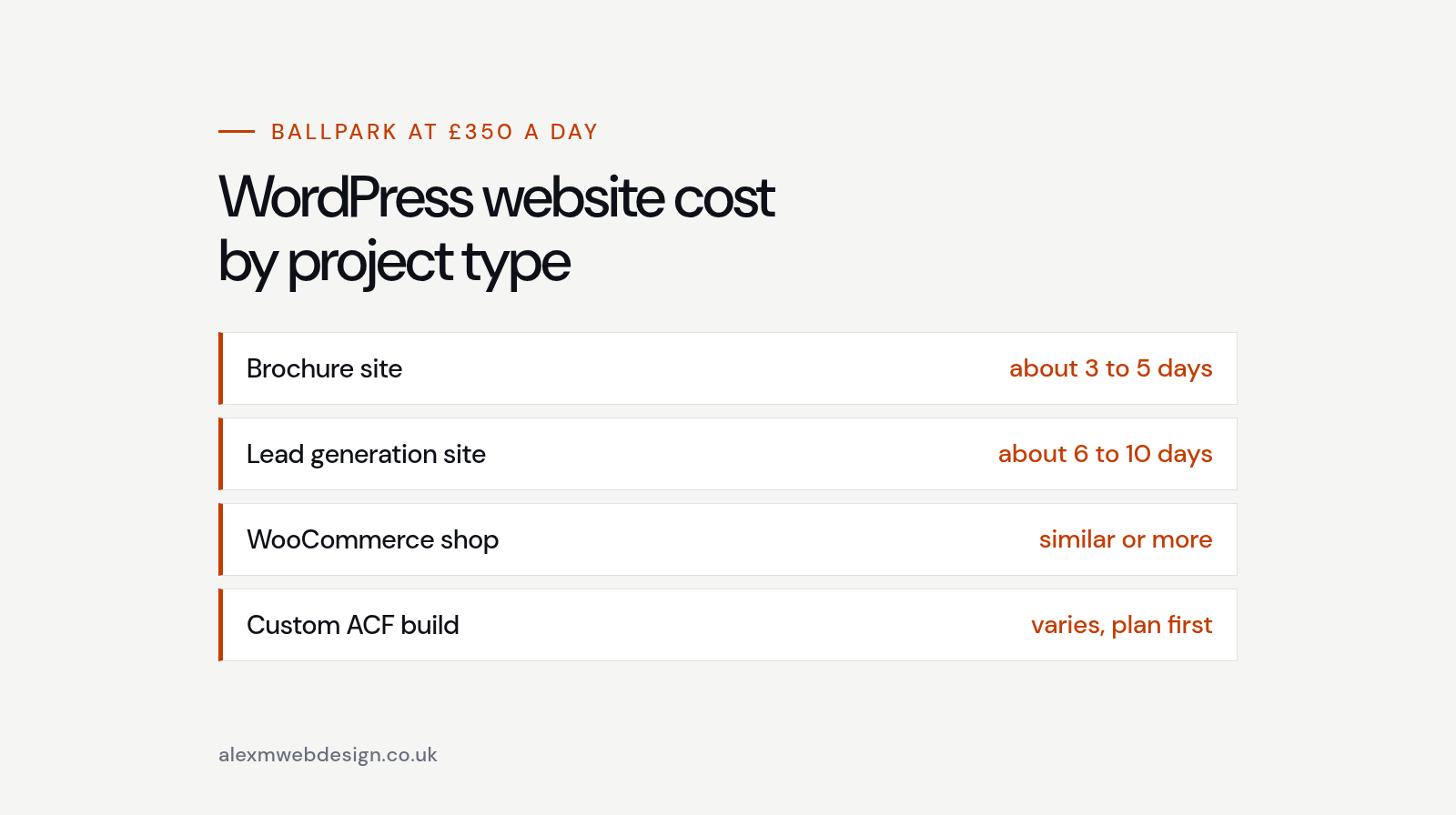
I charge £350 a day for builds and £45 an hour for smaller jobs and support. That makes it fairly easy to turn the size of a project into a rough price, so here’s how a few common types of site tend to look. These are ballpark figures to help you plan, not a quote. The real number always depends on the detail.
A simple brochure site. Five or six pages, a contact form, a blog and a mobile-friendly layout built on Divi. If the content’s ready, this is usually around three to five days of work, so roughly £1,050 to £1,750.
A lead generation site. More pages, several service or location pages, a proper quote form with Gravity Forms, maybe a CRM connection and some landing pages. This is more like six to ten days, so roughly £2,100 to £3,500.
A WooCommerce shop. A small catalogue with shipping, payments and a tested checkout often lands in a similar range to a lead generation site, and more if there are lots of products, product options or custom checkout rules.
A custom ACF build. Bespoke templates, custom post types and a tailored editing experience. These vary the most, so I’d always want to see the plan first.
A redesign or rebuild. Often cheaper than a new site if the content and structure can be reused, and sometimes more expensive if there’s a lot to untangle, migrate and redirect first.
If you’ve seen much higher or much lower numbers elsewhere, that’s normal. The spread in WordPress website cost across the UK is huge, mostly because of what’s included and who’s doing the work.
Running costs after your site goes live
The build is a one-off. The running costs keep going for as long as you have the site, so they’re worth budgeting for from day one. For a small business, these are the main ones.
Hosting. This is where your site lives. Cheap shared hosting can be a few pounds a month, but it’s often slow and the support is limited. Good managed WordPress hosting costs more, and it’s usually worth it for speed, backups and security.
Domain name. A .co.uk or .com domain is a small yearly cost, usually just a few pounds a month when you spread it out.
Premium theme and plugin licences. Divi, Gravity Forms, ACF Pro and many WooCommerce extensions have yearly licences that keep the updates and support coming. Check the current prices on each provider’s own site, because they change, and some offer lifetime licences that work out cheaper over time.
Maintenance and support. WordPress, your theme and your plugins all need updating regularly. Someone also needs to check backups, keep an eye on security and fix things when an update clashes with something else. You can do this yourself, or pay a developer by the hour or on a monthly care plan.
Add those together and you’ve got the real ongoing WordPress website cost. It’s usually a modest monthly figure, but it’s not zero, and leaving it out is how sites end up slow, out of date or hacked.

Hidden costs that catch people out
Most surprises in a WordPress website cost come from the same few places. None of them are unusual. They just weren’t in the original plan.
Scope creep. “Can we just add a booking page?” is a fair question, but each small addition adds time. A good developer will tell you when something’s outside the original quote before doing it, not after.
Content arriving late. If the site’s built but the text isn’t ready, the project stalls. Sometimes that means paying for extra time to restart, or launching with placeholder content you then have to replace.
Paid plugins you didn’t know you needed. A feature that sounds simple can need a premium plugin with its own yearly fee. It’s worth asking which plugins your site will rely on and what each one costs to keep.
Migrating an old site. Moving content, images and old page addresses across takes care. Redirects from old URLs matter a lot, because without them you can lose the search traffic you’ve already built up.
Fixing a cheap build later. This is the expensive one. A site built in a hurry, with too many plugins and no thought for speed or updates, often needs rebuilding sooner than you’d expect. Paying a little more up front is usually cheaper than paying the WordPress website cost twice.
How to keep your WordPress website cost down
You don’t need to cut corners to keep a site affordable. You just need to be clear about what you need now and what can wait.
Start with the pages that bring in work. For most businesses that’s the home page, your services, some proof that you’re good at what you do and an easy way to get in touch. Case studies, resources and extra landing pages can come later, once the site’s earning its keep.
Get your content ready before the build starts. Even rough drafts help. The less a developer has to wait or guess, the quicker and cheaper the project is.
Choose the simplest tool that does the job. If a page builder like Divi gives you everything you need, you don’t have to pay for a fully custom theme. If a standard contact form does the job, you don’t need a complex multi-step one yet.
Keep the plugin list short. Every plugin is something else to update, something else that can clash, and sometimes something else to pay for each year. A good developer will build features properly rather than stacking plugins on top of each other.
Look after the site once it’s live. Regular updates and backups are far cheaper than fixing a hacked or broken site. An hour or two a month is usually enough for a small business site.

Already got a site? Check it before you rebuild it
Plenty of businesses come to me thinking they need a new website, when what they really need is a few fixes. If the site looks fine but isn’t bringing in enquiries, the problem might be slow pages, missing page titles, broken links, or pages that don’t match what people actually search for.
That’s what my SEO Health Check is for. It’s a fixed-price review, from £250 for a half day, that tells you what’s holding the site back and what to fix first. Sometimes the answer is a rebuild. Often it isn’t, and a handful of targeted changes saves you the full WordPress website cost of starting again.
For agencies: white-label WordPress help
If you run an agency and you’ve got more WordPress work than hands, I also take on white-label builds and overflow. I’ve worked in agencies myself, so I’m used to working from designs, fitting into your process and keeping your client relationship yours. Divi, ACF, Gravity Forms and WooCommerce builds are all fine, and so is Shopify and Liquid work if you need it.
Agency overflow is priced the same way, by the day for builds and by the hour for smaller jobs, so the WordPress website cost for overflow work is easy to fit into your own quote.
WordPress website cost FAQs
Is WordPress cheaper than Shopify?
For a site that isn’t mainly a shop, a WordPress website cost is usually lower over time, because you’re not paying a monthly platform fee or app subscriptions. For a straightforward online shop, Shopify can work out simpler. It depends on what the site needs to do.
Can I build a WordPress site myself to save money?
Yes, and plenty of people do. The trade-off is time, and the risk of building something slow or hard to maintain. Some businesses start themselves and bring in a developer later to tidy things up, which is a sensible way to spread the WordPress website cost.
How long does a WordPress website take to build?
A simple brochure site can be ready in a week or two once the content is in. Bigger sites and shops take longer, mostly because of content, feedback rounds and testing rather than the build itself.
Does the WordPress website cost include SEO?
The basics should always be included: titles, descriptions, headings, alt text, a sitemap and good speed. Ongoing SEO work, like keyword research and new content, is usually separate. Ask what’s included so you’re comparing like for like.
Getting an accurate quote for your site
The quickest way to get a reliable number is to share a bit of detail up front. A short list of the pages you think you need, any features like forms, bookings or a shop, a couple of sites you like the look of, and whether your content is ready will let a developer give you a proper estimate rather than a guess.
It also helps to say what budget you have in mind. That’s not so a developer can fill it. It’s so they can tell you what’s realistic for that money and what could wait for a second phase.
You can see some of the sites I’ve built on my work page, read more about what I do and how I work, or find out a bit about me. If you’d like a straight answer on what your WordPress website cost is likely to be, get in touch here or email info@alexmwebdesign.co.uk. I’ll tell you honestly what you need, even if it’s less than you expected.